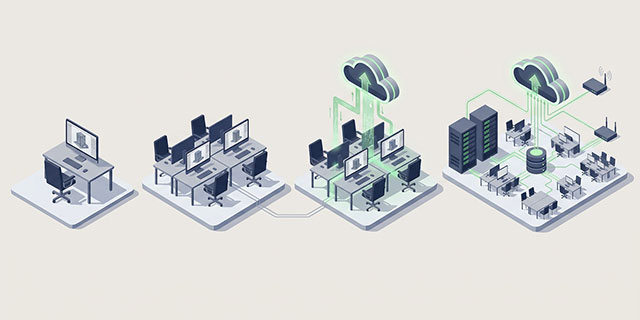
Autodesk Forma brings your projects to the cloud. auxalia Cloud Solutions turn them into end-to-end processes: Data flows automatically between Forma and your enterprise systems, model data is processed in the cloud, and models are checked against your requirements.
From a Local BIM Solution to an Integrated Enterprise Solution
Autodesk automates within Forma. auxalia automates between Forma and your systems.
Value creation with digital solutions grows in four stages:
Goal: Workfaster in the tool
Solution: Autodesk Revit, Plant 3D, and auxalia Tools
Goal: A single source of data for all stakeholders
Solution: Autodesk Forma
Goal: Processes run in the background; rules are checked automatically
Solution: auxalia Automation, auxalia Validation
Goal: Project data becomes company data
Solution: auxalia Automation Connectors to DMS, ERP, and FM
Your Benefits
Test first, then automate
Models are validated against your requirements before data is processed further.
Data flows instead of being copied
Recurring transfers run automatically, in both directions, and are logged.
Everyone automates within their own area of responsibility
Permissions are derived from the project; groups represent your organization. No service accounts with full access.
Your data stays with you
Operates within the EU, no documents are stored, and every run is traceable.
Automation That Keeps Your Team
Configured, not programmed: can be modified without a developer, without a release, and with a log.
From construction practice, not from the data center
With AEC since 1987. Software, consulting, pilot projects, and support—all from a single source.
Where do you stand when it comes to automation?
You’re copying data between Forma and SharePoint manually. auxalia Automation: Synchronization & Data Transfer. Up and running in just a few days.
You have your own scripts or Power Automate flows that aren’t running reliably. auxalia Automation replaces them with configured workflows that your team maintains itself.
You receive models from many planners, with varying levels of quality. auxalia Validation checks every delivery against your requirements and reports discrepancies as BCFs.
You might be wondering if Autodesk doesn’t do this itself. Autodesk builds the building blocks—approval statuses, attributes, APIs. We build the workflow that spans your system boundaries.
Our Cloud Solutions
Stronger Together: auxalia Validation tests. auxalia Automation acts. Test reports to SharePoint, BCF to the planner, approval only after passing the test—test first, then automate.
auxalia Cloud Automation
Data flows instead of being copied.
Integration and automation platform for AEC data on Autodesk Forma. Connects Forma to SharePoint, Microsoft 365, cloud storage, and enterprise systems. Configured graphically, with permissions derived from the project, and fully logged.
IDS-based model verification in Autodesk Forma. Manually or on a scheduled basis, it verifies IFC models against your requirements, delivers results as BCF tickets, and manages your IDS documents.
From 30 transfers per week to zero. A design firm transfers models and plans daily between Forma and SharePoint. With auxalia Automation, this runs in the background.
30 operations/week × 15 min × 44 weeks = 330 hours per year; payback period of 4.4 months; 175% ROI in the first year
How to Get Started
Ready to go in just a few days. No installation required; sign in with your Microsoft or Autodesk account.
Demo
We'll show you how auxalia works using your own use case. Duration: 45 minutes.
Workshop
In a single day, we'll clarify data flows and requirements. You'll receive a prioritized workflow list, initial IDS, and a cost estimate.
Pilot
Two workflows or one test set will go live using your own data.
Expansion
You can expand your automation at your own pace. Support is included.
FAQ: Safety and Operation
auxalia Cloud Solutions run on Microsoft Azure in the EU. The data is stored in the Western Europe region and processed in the Northern Europe region.
No. auxalia Automation and auxalia Validation process the contents of your files, but do not store them permanently.
You sign in with your Microsoft or Autodesk account. The connection uses OAuth 2.0 instead of passwords. Access tokens are stored encrypted with AES-256.
Permissions are derived from the respective project. You can map out your organization using groups for each project or location. There is no service account with full access.
Yes. An audit log records every run.
No. auxalia does not have access to the data in your workspace.
Yes. We will provide you with the Data Processing Agreement (DPA) and the technical and organizational measures (TOMs) upon request.
Your first step toward a comprehensive solution
We’re happy to answer your questions and offer you customized solutions for your projects.