
auxalia

Cloud Automation
Workflow automation and integration for Autodesk Forma
Let data flow instead of copying files.
A model is uploaded to Forma. A drawing is added to SharePoint. A partner drops files into Dropbox. Every time, someone has to copy, open, check and notify others manually.
auxalia Automation takes care of this work. Files are routed to the right locations, metadata travels with them, model data is extracted without opening Revit, and the right people are notified. Configure your workflows instead of programming them.
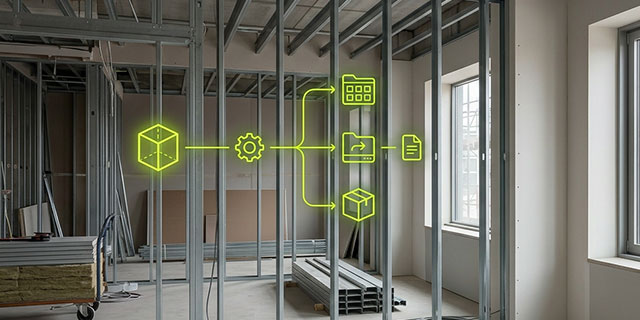
Less manual work. More time for design.
Build once. Reuse across projects.
- Develop, adapt and distribute workflows
- Services for transforming and analysing AEC data
- Open API for custom services and libraries
Roles & permissions
- Permissions are inherited from the project, while groups reflect your organisation
- No service account with full access to your hub
- Every user automates workflows within their own scope of responsibility
Governance & security
- No documents stored permanently, your data stays under your control
- Access is restricted to the permissions of the user who created the workflow, with all activity fully logged
How it works: Trigger. Process. Execute.
Set a rule once, and it runs automatically every time the conditions are met.

Trigger
When should the workflow run?
- On a schedule, for example every night
- Manually, whenever you need it
- When a file or model is added or modified in Forma, SharePoint, OneDrive or Dropbox

Process
What should happen?
- Filter, rename and transform files; map metadata
- Run Revit scripts on models in the cloud
- Analyse results using AI
- Zip and unzip files, or read Excel data
- Connect to any system with a REST API

Execute
Where should the results go?
- Copy or move files between platforms
- Store reports and results where your team works
- Create copies in storage you control
- Send notifications to Microsoft Teams or webhooks to your IT systems
Five tasks auxalia Automation takes care of for you
Synchronise data between Forma and your document repositories
auxalia Automation synchronises Forma with SharePoint, Microsoft 365, OneDrive, Google Drive and Dropbox. Data flows in both directions, without intermediate copies, either on a schedule or whenever changes occur.
- Metadata travels with the files: attributes from Forma become actual columns in SharePoint
- Deliver project information to clients according to predefined standards
Keep your project data accessible, even without Forma
auxalia Automation regularly copies all project files to storage you control, including PDFs, DWG and IFC files with their associated properties. Your data remains readable, structured and ready for handover.
- Archive project data after completion
- Migrate existing projects from BIM 360 to Forma
- Export project information, including issues, RFIs and sheets, as a package of tables
Analyse Revit models without opening them
Revit scripts run directly on models in the Autodesk cloud. No Revit installation is required, and nobody needs to open the model file.
- Extract room data for facility management
- Check parameters and compliance with modelling standards
- Export quantities and schedules to Excel
- Apply flexible parameter mapping across all workflows
Automate drawing checks and approval workflows
Drawing reviews are triggered automatically by predefined events. The original drawing and the review copy remain linked, and the review report is stored as a separate object.
- Generate drawing numbers using a central numbering service
- Create a PDF and QR code after every review
- Enable mobile review workflows that link directly from a building component to its document
Connect Forma to your business systems
auxalia Automation integrates enterprise document management systems (DMS), ERP systems such as SAP S/4HANA, facility and asset management systems, PlanRadar, Dalux and other Forma applications, including tasks, issues and defects.
Once configured, each connector can be reused in any workflow.
- Build custom connectors using the open API
More than moving files
As soon as a model arrives in Forma or SharePoint, auxalia Automation runs your Revit script in the Autodesk cloud. The resulting data — such as room information or quantity take-offs — can then be used in subsequent workflow steps.
An AI step analyses the information generated earlier in the workflow and determines how the process should continue.
Typical applications include summarising review results, flagging deviations from company standards, and classifying documents before routing them to the appropriate team.
Each office and project can have its own workflows, connections and logs. Every group has its own administrators and members, and users can have different roles in different groups.
Connections are restricted to the folders you explicitly make available.

Workflows for typical project roles
- BIM managers automatically receive a room schedule for facility management whenever a new model version is uploaded to Forma. The Excel file is saved in SharePoint.
- Project managers receive a Microsoft Teams notification as soon as a designer uploads a new drawing. The drawing is already available in the project folder.
- Project coordinators find files received from partners via Dropbox automatically placed in the appropriate Forma folder.
- Document controllers have an up-to-date view of changed files from Forma in SharePoint every morning.
- Clients and facility management teams receive all project files in their own storage after project completion, in a readable and structured format ready for handover.
Frequently asked questions
Autodesk Forma, Microsoft SharePoint, OneDrive for Business, Google Drive, Dropbox, Microsoft Teams and auxalia cloud storage. A REST API workflow step lets you connect any other system that provides an API.
Nothing. auxalia Automation operates entirely between cloud services, without agents or VPN connections. Your administrator connects each platform once using their own credentials.
Within a few days, access can be configured, the systems connected and your two most important processes running as automated workflows.
Data is processed in the EU on Microsoft Azure. File contents pass through auxalia Automation but are not stored permanently. Only technical information, such as file names and versions, is retained for operation and monitoring.
Your administrators control access through groups for each project or location. Connections can be restricted to individual folders.
No. auxalia Automation is not another place to store your files. It automates the work between the platforms you already use.
Not in the traditional sense. You can create a readable, structured copy of your data, including metadata, outside Forma. This data remains accessible even without a Forma account, for example after a project has been completed.
Restoring a previous version or transferring data back into Forma is not yet supported. Both capabilities are planned.
Autodesk provides the building blocks, including approval statuses, custom attributes and a Reviews API. With Forma Construction Connect (based on Workato) and Power Automate, you can build your own workflows, but doing so may require API expertise and involve pricing based on connections or tasks.
auxalia Automation is designed for project teams. It offers AEC-specific connectors that respect project permissions, ready-to-use templates, fixed pricing and support in German. Changes can be made without developer involvement or a software release.
Autodesk Assistant complements this approach: it answers questions and drafts content, while auxalia Automation executes recurring workflows and logs their activities.
Questions about auxalia Cloud Automation?
Tell us which processes you want to automate and which systems you want to connect to Autodesk Forma. Our team will get in touch to discuss how auxalia Automation can support your project workflows.